
Version: Business Enterprise Advanced
Platform: Web Android IOS
Role: User Manager Accountant Administrator
You have subscribed through the N2F WEB platform, and we thank you for your trust!
The WEB subscription is managed from your administrator space. You can therefore add or remove licenses at your convenience.
To add a user, please refer to this detailed article: How to add a new user in N2F?
If you add users during your subscription period, they will be billed on a pro-rata basis for the remaining duration of your subscription.
How can I adjust my licenses when an employee leaves?
Thanks to automatic renewal, your subscription is automatically extended under the same conditions at each renewal.
If you need to remove licenses—for example, for users who have left your company during your subscription period—you can proceed as follows for your upcoming renewal:
- Disable automatic renewal:
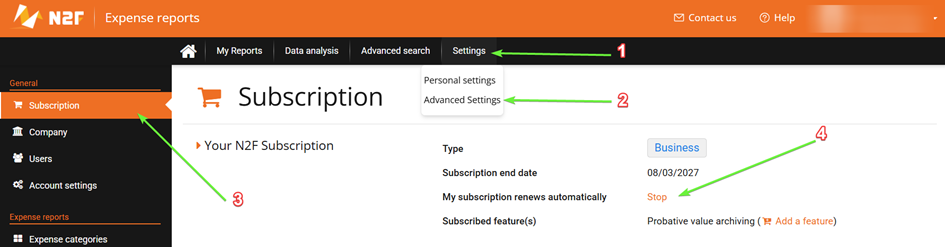
From the web application, go to the Subscription tab, then click “Stop” on the line stating that “my subscription renews automatically.”
- Delete the user account of your employee by following this procedure: How to manage the departure of an employee?
- Renew with the desired number of licenses at the time of renewal:
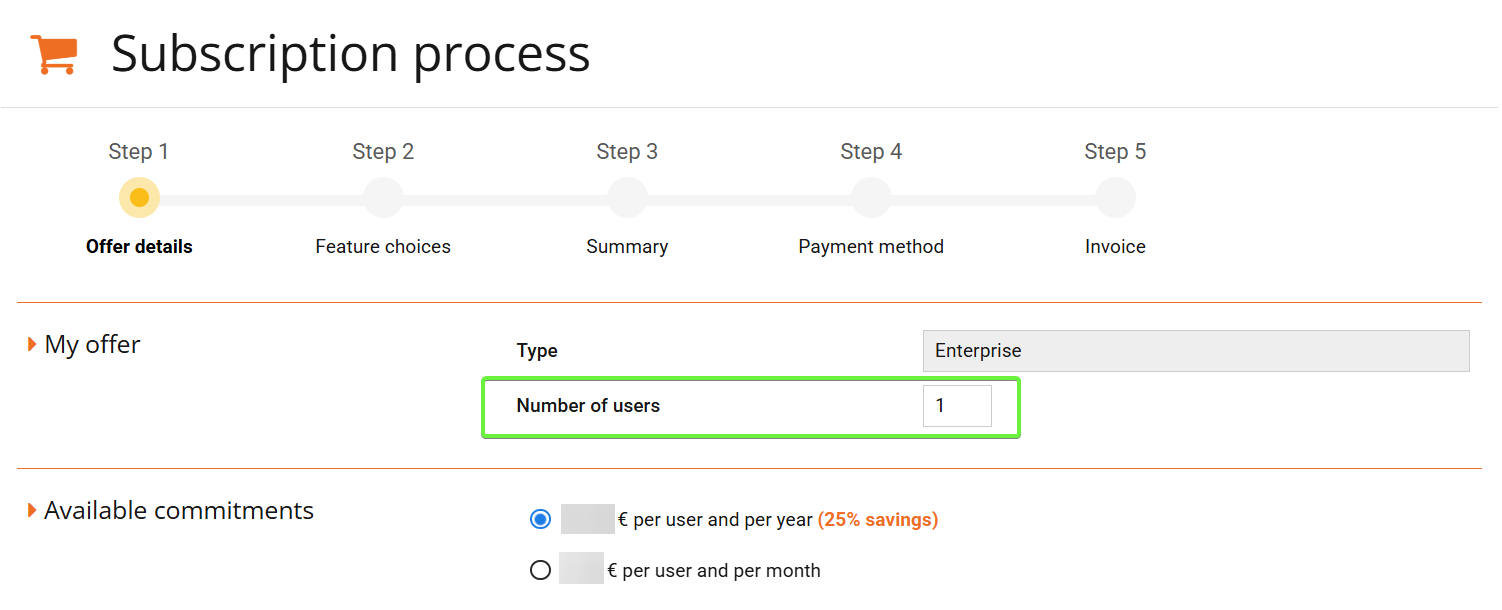
From the web application, enter the Subscription tab, then click on “Extend my subscription”.
In the “number of users” field, you can enter the number of licenses you wish to subscribe to for your upcoming subscription period.
For further details and any additional questions,
Feel free to contact our support team :
support@n2f.com
+33 4 28 38 30 45
+1 (505) 204-7434 (USA)